


Bitget Wallet Crypto Gifts: How They Work, How to Send and Claim
2026-10-02
Sending crypto doesn't have to mean copying a wallet address and asking someone to send you their address. With Bitget Wallet's
Send Gift feature, you can package supported crypto into a digital gift and share it through a link or QR code.
The feature was previously called
Crypto Red Packet, so you may still see or search for that name. The current Send Gift experience lets you choose a gift design, add a message, select a token and amount, and share the gift with your friends. The recipient can then open the link and claim the crypto directly to their Bitget Wallet.
Key takeaways
-
Send Gift is Bitget Wallet's current name for its crypto gifting feature, previously known as Crypto Red Packet.
-
You can send supported assets such as USDT, USDC, BNB, and ETH, and choose the number of gifts and amount for each one.
-
The sender pays the gas needed for the recipient to claim the gift, so the recipient doesn't need to hold additional network tokens just to receive it.
-
Gift links are valid for 24 hours. Unclaimed funds and prepaid receiving gas are returned to the sender after the gift expires, with a small amount of gas potentially deducted for the refund.
-
Gifts can be shared through a link or QR code, and recipients who don't already have Bitget Wallet can download the app through the shared link.
What is Bitget Wallet Send Gift?
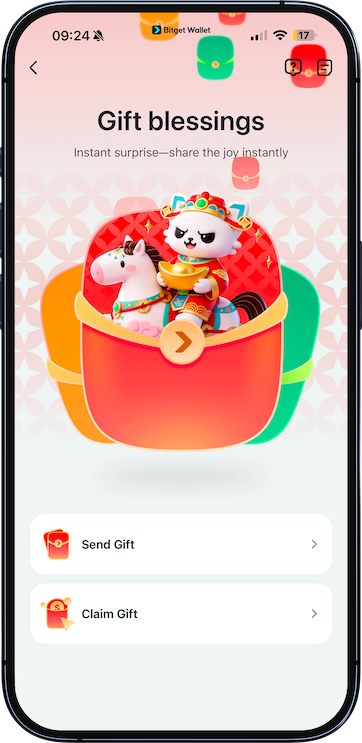
Send Gift is a crypto gifting feature built into Bitget Wallet. It lets you send crypto to another person without making the experience feel like a traditional wallet transfer.
Instead of simply sending tokens to a wallet address, you can choose a gift design, add a personal greeting, decide how many gifts to create, and set the amount for each gift.
You can then share the gift using a link or QR code.
The feature was previously called
Crypto Red Packet, which is why you may still see references to "red packets" when searching for Bitget Wallet's crypto gifting feature.
What can you send?
You can choose from supported tokens when creating a gift, including:
-
USDT
-
USDC
-
BNB
-
ETH
The available assets may vary depending on the current Send Gift service.
Who can receive a crypto gift?
You can send a gift to anyone. The recipient doesn't need to already have Bitget Wallet installed.
If they open the gift link without the app, they'll be redirected to download Bitget Wallet before claiming the gift.
How to send a crypto gift with Bitget Wallet
Before creating a gift, update your Bitget Wallet app to
version 9.34.0 or later.
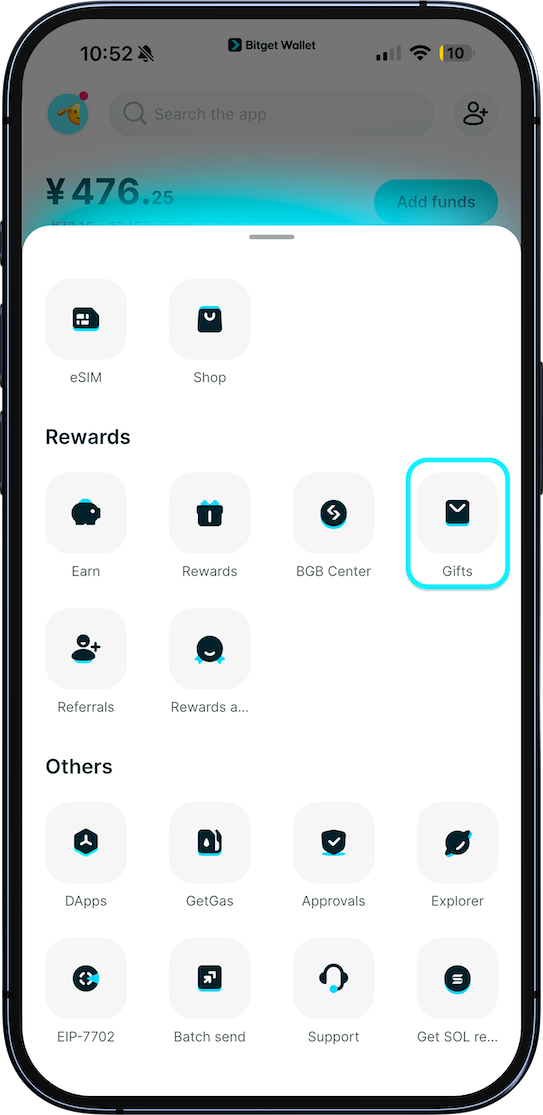
1. Open Send Gift
Open Bitget Wallet and go to:
Home > More > Gifts > Send a gift
This takes you to the Send Gift page.
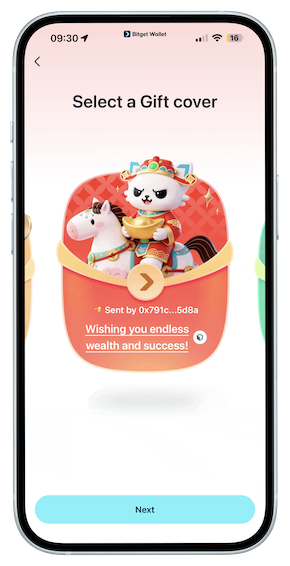
2. Choose a gift design
Swipe left or right to browse the available gift designs.
Each design includes a default greeting that you can customize. Add your own message before sending if you'd like to make the gift more personal.
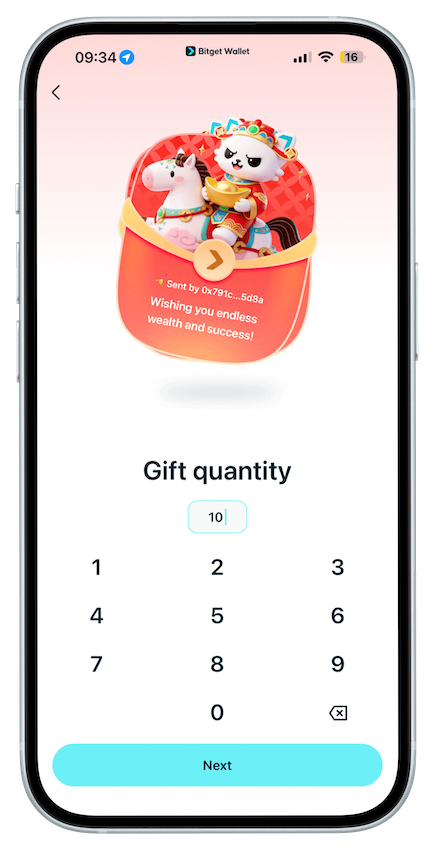
3. Choose the number of gifts and amount
Enter the number of gifts you want to send and the amount for each gift.
Then choose the token you want to send, such as USDT, USDC, BNB, or ETH.
Before continuing, check that the token, number of gifts, and amount are correct.
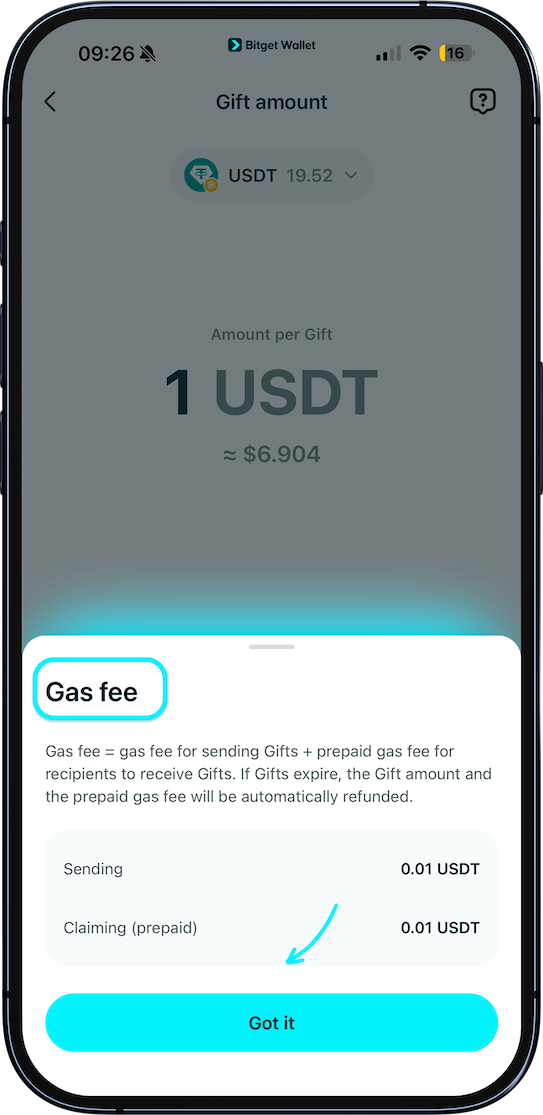
4. Review the gas fees
Sending and receiving a crypto gift involves gas fees.
The sender prepays the gas needed for the recipient to claim the gift. This means the recipient doesn't need to keep the network's native token just to cover the receiving transaction.
You'll see the applicable fees on the confirmation page before you sign the transaction.
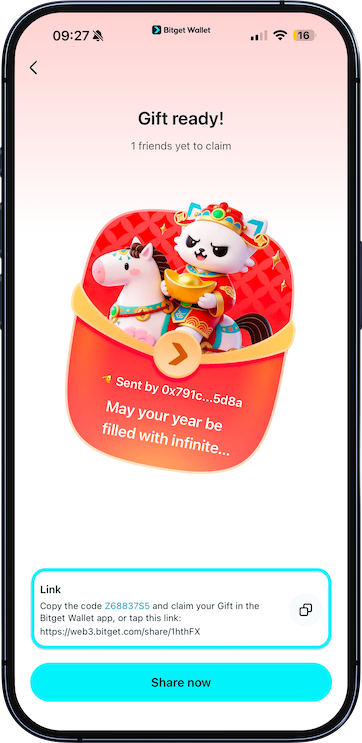
5. Confirm and share the gift
Review the gift details, then sign and confirm the transaction.
Once it's confirmed, you can copy the gift link and send it to your friend.
You can also tap
Share to share the gift through social media or another available channel.
Keep in mind that
anyone with the gift link can claim the gift, so share it only with the intended recipient.
6. Claim the gift within 24 hours
Every gift link is valid for
24 hours from the time it is created.
If not all of the gifts are claimed before the link expires, the remaining funds and prepaid receiving gas are returned to your wallet. A small amount of gas may be deducted to process the refund.
How to claim a crypto gift
Received a crypto gift? You can claim it through a gift link, QR code, or gift code.
1. Open the gift link or scan the QR code
Tap the link shared by the sender or scan the QR code to open the gift page.
If the sender gives you a gift code instead, open Bitget Wallet and go to:
Home > More > Gifts
Then enter the gift code.
Because gifts expire 24 hours after they're created, it's a good idea to claim yours as soon as you receive it.
2. Tap "Claim"
Once the gift page opens, tap
Claim.
You'll see the amount you've received, and the crypto will be automatically credited to your Bitget Wallet.
You can then open the
Wallet page to check your new asset.
Do you need to pay gas to claim a gift?
No. The sender prepays the gas required for the recipient to claim the gift.
That's one of the useful parts of Send Gift: the recipient doesn't need to first buy or transfer the network's native token just to receive the crypto.
What happens if a crypto gift isn't claimed?
A gift link expires 24 hours after it is created.
If some gifts remain unclaimed when the link expires:
-
The unclaimed crypto is returned to the sender.
-
The prepaid receiving gas is returned to the sender.
-
A small amount of gas may be deducted to process the refund.
There's also a limit to how many gifts can be claimed from a particular gift link. If all available gifts have already been claimed, the gift will show as fully claimed and can't be claimed again.
How to check your Bitget Wallet gift history
You can check both the gifts you've sent and the gifts you've received.
Check gifts you've sent
Go to
History > Sent, then select the gift you want to review.
You can see the wallet addresses that have claimed the gift.
Check gifts you've received
Go to
History > Claimed, then select a gift to view its details.
This gives you a record of the crypto gifts you've claimed through Bitget Wallet.
What if the recipient doesn't have Bitget Wallet?
You can still send them a crypto gift.
When they open the gift link, they'll be redirected to download Bitget Wallet if the app isn't already installed.
After installing the app, they can open the gift and claim the crypto.
This also means you don't need to ask a friend to set up a wallet before sending them a gift.
What if the crypto doesn't appear after claiming?
In some cases, network congestion can delay the arrival of the received asset.
If you don't see the crypto immediately after claiming:
-
Wait a few minutes and check your Wallet page again.
-
If the asset still hasn't appeared after one hour, contact Bitget Wallet customer support.
-
Have your wallet ID and gift code ready when contacting support.
These details can help the support team check the transaction.
What can you do with crypto after receiving a gift?
Once the crypto is credited to your Bitget Wallet, you can manage it like other supported assets in your wallet.
Depending on the asset and available services, you can use your crypto to:
-
Trade supported crypto assets
-
Buy supported tokenized assets
-
Invest in supported precious metals
-
Spend crypto through available payment features
-
Use eligible Earn products
So receiving a crypto gift doesn't mean the crypto has to sit in your wallet. You can continue managing it through the services available for that asset.
Crypto gifting with Bitget Wallet
Crypto gifting can be as simple as sharing a link.
With Bitget Wallet's Send Gift feature, you can choose a design, add a message, select a supported token and amount, and send the gift through a link or QR code. The recipient can then claim the crypto directly to their wallet, while the sender covers the gas needed for the claim.
If you've seen Bitget Wallet's Crypto Red Packet feature before, Send Gift is the current name for the same crypto gifting experience.
Frequently asked questions
What is a crypto red packet?
A crypto red packet is a way to send cryptocurrency as a digital gift. In Bitget Wallet, the feature is now called
Send Gift. You can choose a design, select a supported token and amount, and share the gift through a link or QR code.
How do I send a crypto gift with Bitget Wallet?
Open Bitget Wallet and go to
Home > More > Gifts > Send a gift. Choose a gift design, enter the number of gifts and amount, select a supported token, review the fees, and confirm the transaction. You can then share the gift link or QR code.
How do I claim a Bitget Wallet gift?
Open the gift link, scan the QR code, or enter the gift code through
Home > More > Gifts. Tap
Claim, and the crypto will be credited to your Bitget Wallet.
How long is a Bitget Wallet gift valid?
A gift link is valid for
24 hours after it is created. If some gifts remain unclaimed after that time, the remaining funds and prepaid receiving gas are returned to the sender, minus a small amount of gas that may be required to process the refund.
Does the recipient pay gas to claim a crypto gift?
No. The sender prepays the gas required for the recipient to claim the gift.
Can I see who claimed my crypto gift?
Yes. Go to
History > Sent, select the gift, and you can see the wallet addresses that have claimed it.
Table of contents

Recommended
 Which Wallet Is the Most Secure for Storing Cryptocurrencies?2026-07-12 | 5 mins
- How Does CoinJar Compare to Other Cryptocurrency Wallets?2026-07-12 | 5 mins



