


How to Buy Tokenized Stocks on Bitget Wallet: Step-by-Step Guide
2026-09-15
Key Takeaways
-
Bitget Wallet supports tokenized U.S. stocks and ETFs through Reality, xStocks, and Ondo.
-
To buy tokenized stocks, go to Trade > Stocks, search for a company, ETF, or ticker, choose an available provider, and place your order.
-
Before trading, check the selected provider, network, payment token, order type, price, fees, and current liquidity conditions.
Bitget Wallet lets eligible users trade supported tokenized U.S. stocks and ETFs directly from a self-custodial wallet. Available products include tokenized assets from
Reality
,
xStocks
, and Ondo.
The process is straightforward: search for a stock or ETF, choose a provider, select your order settings, and confirm the trade. Before placing an order, review the network, payment asset, fees, and trading conditions shown in Bitget Wallet.
What Are Tokenized Stocks & ETFs on Bitget Wallet?
Tokenized stocks and ETFs are onchain assets designed to provide economic exposure to traditional securities, such as U.S. company shares and exchange-traded funds.
For example, a tokenized stock may provide exposure to a company such as NVIDIA, Tesla, or Microsoft. A tokenized ETF may provide exposure to a fund that tracks an index, sector, or group of assets.
On Bitget Wallet, supported tokenized stocks and ETFs are available through multiple providers:
-
Reality
-
xStocks
-
Ondo
The same underlying stock or ETF may be available from more than one provider. Check the provider label before trading, as networks, payment options, liquidity, and trading conditions can differ.
To learn more about Reality rTokens, read:
What Is a Reality rToken? A Guide to Tokenized U.S. Stocks on Bitget Wallet
How to Buy Tokenized Stocks on Bitget Wallet
1. Find the Stock or ETF You Want to Trade
Download Bitget Wallet, then go to:
Trade > Stocks
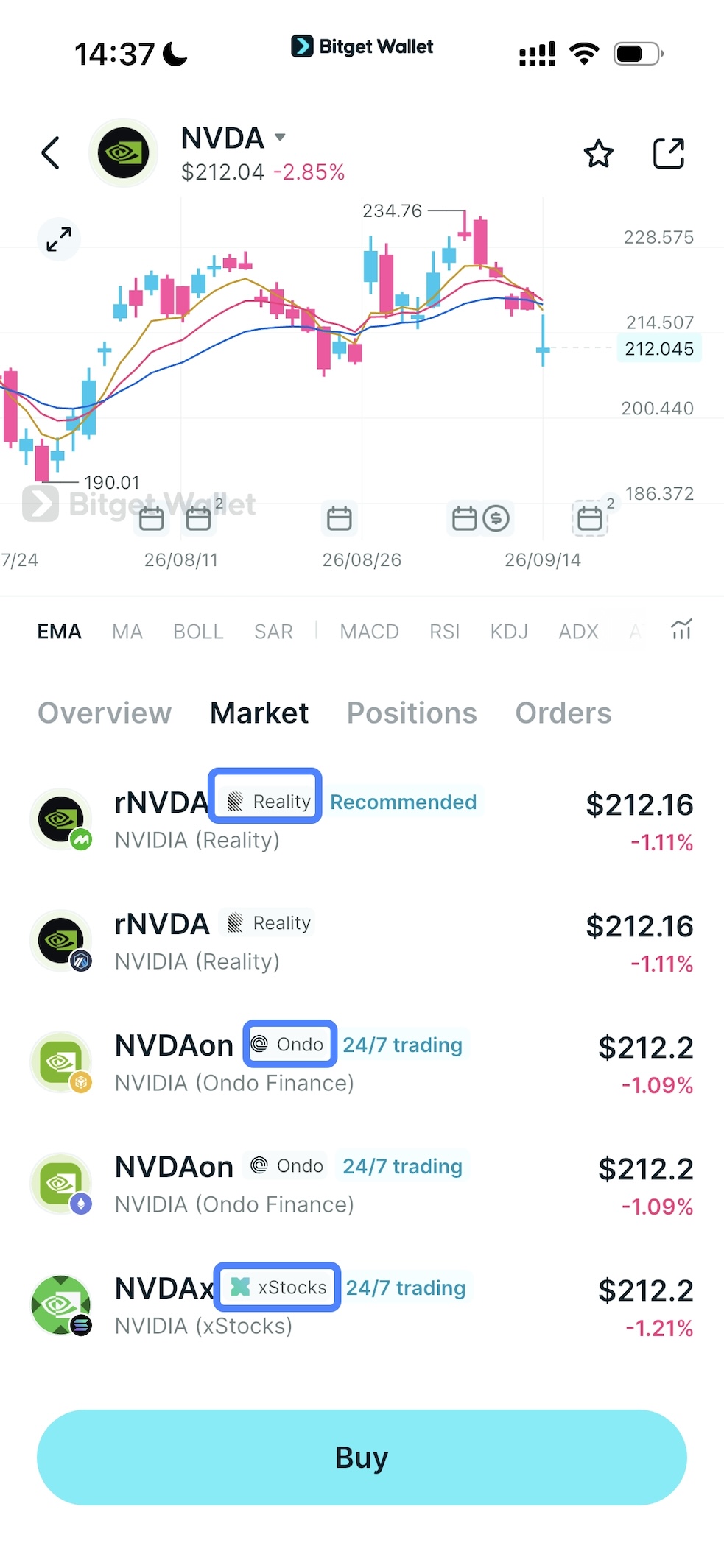
Search for the company name, ETF name, or ticker symbol you want to trade.
If the asset is available through multiple providers, choose the tokenized version you want to use, such as
Reality,
xStocks, or
Ondo.
2. Choose Your Order and Payment Asset
Select
Buy, then choose an available order type:
-
Market order: Buy at the best available price shown at the time of execution.
-
Limit order: Set the price at which you want to buy. Your order will remain open until it is filled, cancelled, or expires.
Enter the amount you want to trade and select an eligible payment asset.
If your payment asset is held on another network, Bitget Wallet can automatically route your trade through an available cross-chain path.
Reality rToken note: Limit orders for Reality rTokens require
USDT on the same network as the selected rToken.
3. Review and Confirm Your Trade
Before confirming, review:
-
The stock or ETF you selected;
-
The tokenized-stock provider;
-
The network and payment asset;
-
Your order type and price;
-
Trading fees;
-
Any applicable price impact;
-
Estimated output and execution details.
Once you confirm, Bitget Wallet will submit your order.
If the trade is completed, your tokenized stock or ETF will be held directly in your wallet. You can view your positions, open orders, transaction history, and other asset records from the
Stocks interface.
How to Sell Tokenized Stocks on Bitget Wallet
Selling a tokenized stock or ETF follows the same basic process.
-
Go to Trade > Stocks in Bitget Wallet.
-
Open the tokenized stock or ETF position you want to sell.
-
Select Sell and enter the amount you want to sell.
-
Choose an available order type, then review the provider, network, expected output, price, and fees.
-
Confirm the order and monitor its status in the Stocks interface.
Depending on the order type and market conditions, an order may execute immediately or remain open until it is filled.
What Should You Check Before Trading Tokenized Stocks?
Before placing an order, use this quick checklist:
| Check | What to review |
| Asset | Confirm you selected the intended stock or ETF. |
| Provider | Check whether you are trading Reality, xStocks, or Ondo. |
| Network | Make sure the asset and payment token are on the expected network. |
| Order type | Understand whether you are using a market or limit order. |
| Price and fees | Review the displayed price, fees, estimated output, and price impact. |
| Trading conditions | Check the available liquidity and expected execution conditions. |
Tokenized Stocks on Bitget Wallet FAQ
Can I buy tokenized U.S. stocks on Bitget Wallet?
Yes. Bitget Wallet supports selected tokenized U.S. stocks and ETFs through providers including Reality, xStocks, and Ondo.
Can I buy tokenized stocks with crypto?
You can use supported payment assets shown in Bitget Wallet to buy available tokenized stocks and ETFs. The payment tokens and networks available can differ by asset and provider.
How do I choose between Reality, xStocks, and Ondo?
If more than one provider is available for the same stock or ETF, review the provider label, supported network, payment options, liquidity, fees, and product details shown in Bitget Wallet before trading.
Can I sell tokenized stocks on Bitget Wallet?
Yes. Open your position in
Trade > Stocks, select
Sell, review the order details, and confirm the transaction.
Why is my tokenized stock order pending?
A pending order may be waiting for your selected limit price, available liquidity, network confirmation, or another execution condition. Check the order status in the Stocks interface.
Risk Disclosure: Cryptocurrency trading involves high market risk. Bitget Wallet is not responsible for any trading losses incurred. Always do your own research and trade responsibly.
Table of contents

Recommended
 What Is a Crypto Wallet Address? Examples and How to Find It2026-08-12 | 3 mins
- What Is a Cold Wallet? A Beginner's Guide to Offline Crypto Storage2026-09-25 | 3 mins
- Fintech Wallets vs. Crypto Wallets: What’s the Difference? (2026 Guide)2026-07-24 | 5 mins



