


How to Pay for TikTok Ads with USDT Card
2026-10-30
If you hold USDT and want to use it for TikTok advertising,
Bitget Wallet Card gives you a simple way to pay for your campaigns. Top up your card with USDT, add it as a payment method in TikTok Ads Manager, and use it to cover your advertising expenses.
You can also earn up to
3% Assetback on qualifying TikTok Ads payments, with rewards available in assets such as Bitcoin, gold, tokenized stocks, and USDC.
How to Pay for TikTok Ads with Bitget Wallet Card
Getting started involves three steps: apply for
Bitget Wallet Card, top it up with USDT, and add it to your TikTok advertising account.
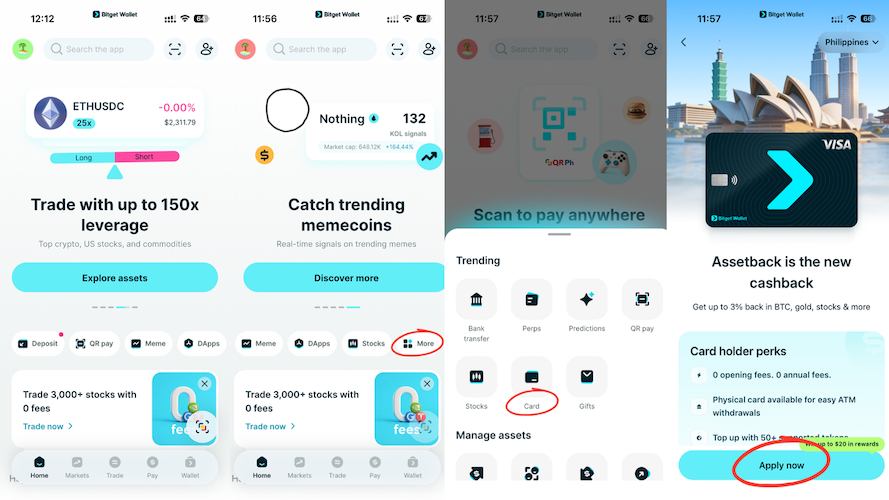
Step 1: Apply for Bitget Wallet Card
Open Bitget Wallet and go to the Card section to check availability and apply. Complete any required identity verification, then follow the in-app instructions to activate your card.
Bitget Wallet Card lets you spend supported crypto assets through the card network. Rather than sending USDT directly to TikTok, you top up your card and use it to pay for your advertising campaigns.
Card availability and application requirements vary by region, so check the options in the Bitget Wallet app to see whether you can apply.
For a step-by-step walkthrough, see
How to Apply for the Bitget Wallet Card.
Step 2: Top Up Your Card with USDT
Once your card is ready, open the Card section in Bitget Wallet and select the top-up option. Choose USDT, enter the amount you want to add, review any applicable fees, and confirm the transaction.
Before confirming, make sure you have enough USDT available and select the correct network if prompted. Wait until the funds appear in your card balance before using the card to pay for advertising.
It helps to estimate your upcoming campaign spend before topping up. Keeping enough available balance to cover your planned payments can reduce the chance of a transaction being declined because of insufficient funds.
For more details, see
How to Top Up Your Crypto Debit Card with USDT.
Step 3: Add Bitget Wallet Card to TikTok Ads Manager
With your card funded, the next step is to add it as a payment method in your TikTok advertising account.
For accounts managed directly in TikTok Ads Manager:
-
Log in to TikTok Ads Manager.
-
Go to Tools and select Billing under Settings.
-
On the Payment page, select + Add payment method.
-
Choose the card payment option, enter your Bitget Wallet Card details, and submit.
For accounts managed through Business Centre:
-
Log in to Business Centre and select Finance → Payment management.
-
If you have upgraded to Payment Portfolio, select Manage under Payment methods.
-
If you have not upgraded, select Settings next to Available balance.
-
Select Add a payment method, enter your card details, and submit.
Once your card has been added, you can use it to pay for TikTok Ads through your account's billing setup. The available payment methods and interface may differ by billing region, currency, and account configuration.
If you cannot add your card or a payment fails, check that your card has sufficient available balance and review the billing options shown in your TikTok account. You can also check your card's current terms for any relevant payment restrictions.
For TikTok's official instructions, see
How to Add or Update a Payment Method.
Why Use Bitget Wallet Card for TikTok Ads?
Use Your USDT to Pay for Advertising
If you already hold USDT, you can put it toward your advertising budget with Bitget Wallet Card. Simply top up your card and use it to pay for your campaigns, rather than sending cryptocurrency directly to TikTok.
This can be useful for freelancers, online businesses, and advertisers who hold stablecoins and want another way to cover recurring business expenses. It also gives you a practical option for using your existing USDT balance to pay for online services.
You can use Bitget Wallet Card for other online advertising platforms, including Meta and Google, where the card is accepted. If you run campaigns across multiple platforms, this gives you another way to pay for those expenses using your crypto holdings.
Earn Assetback on TikTok Ads Spending
Advertising costs can add up as you launch campaigns, test creatives, and reach new audiences. With Bitget Wallet Card, qualifying TikTok Ads payments are included in the Assetback program, so you can earn rewards on eligible spending.
The standard Assetback rate is 2%. Eligible new users and users who meet the applicable monthly spending requirements can unlock the 3% Booster Tier.
You can choose from supported reward assets, including:
-
Bitcoin (BTC)
-
Gold
-
Tokenized stocks and ETFs, including NVIDIA, Tesla, Google, and the S&P 500
-
USDC
For advertisers who spend regularly, Assetback offers an additional benefit on top of paying for campaigns with USDT. You can choose a supported reward asset based on your preferences instead of receiving rewards only as conventional cash cashback.
Keep in mind that Assetback is subject to monthly reward caps, merchant-category exclusions, and risk review. Refunded, reversed, and canceled transactions do not qualify. Check Bitget Wallet for your current reward tier, selected asset, and applicable limits.
For more information, see the
Bitget Wallet Card Assetback Guide.
FAQs
Can I pay for TikTok Ads with Bitget Wallet Card?
Yes. You can use Bitget Wallet Card to pay for TikTok Ads. Top up your card with USDT, add it as a payment method in TikTok Ads Manager, and use it to pay for your advertising campaigns.
Can I earn Assetback rewards when paying for TikTok Ads?
Yes. Eligible TikTok Ads payments qualify for Bitget Wallet Card Assetback. The standard reward rate is 2%, with up to 3% available through the Booster Tier for qualifying users. Reward caps and program conditions apply.
How do I top up Bitget Wallet Card with USDT?
Open Bitget Wallet, go to the Card section, select the top-up option, choose USDT, enter the amount, review any applicable fees, and confirm. See the
USDT top-up guide for detailed instructions.
Risk Disclosure
Cryptocurrency transactions and digital assets involve risks. Review card fees, conversion rates, and reward conditions before making payments. Always check the latest Bitget Wallet Card terms and TikTok's billing requirements.
Table of contents

Recommended
 How to Pay for Meta Ads with USDT (Facebook & Instagram Guide)2026-10-30 | 5 mins
 How to Apply for a Crypto Mastercard2026-01-05 | 5 mins
 How to Apply for a Crypto Visa Card and Start Spending Crypto Worldwide2026-01-02 | 5 mins



